
Back to search
1.6.0
README1.6.0
AntiXray - High-Performance Ore Obfuscation Anti-Cheat Mod








This is a high-performance, highly customizable server-side anti-cheat mod designed to prevent players from using cheat clients for ore X-ray. It employs advanced multi-threaded ore obfuscation technology to ensure that the server does not experience lag due to obfuscation operations, providing a smooth gaming experience for players.
Technical Advantages
- Multi-threaded Processing Distributes ore obfuscation tasks across multiple threads using multi-threading technology, significantly improving processing speed and reducing server performance overhead.
- Seamless Obfuscation Uses advanced obfuscation algorithms to ensure seamless seamless obfuscation of chunk border and achieve perfect ore obfuscation, making it impossible for cheat clients to detect.
- Flexible Configuration Provides detailed configuration files that allow administrators to easily adjust the types of ores, frequency, and intensity of obfuscation to meet the needs of different servers.
- Strong Compatibility Rigorously tested to perfectly integrate with various custom dimensions and server plugins, ensuring no conflicts with other systems or plugins and maintaining stable server operation.
Note:
- Due to the limitations of the Endstone platform, the speed of obfuscating blocks in chunk border on Endstone is over 40 times slower than on LeviLamina, and it cannot achieve the completely seamless obfuscation of chunk border, which is possible on the LeviLamina platform.
Installation
Endstone
- Download the Mod File Download the latest version of the Mod file from the Releases page
- Place the File Place the downloaded Mod file in the
./pluginsdirectory. - Restart the Server Restart the server to load the Mod.
LeviLamina
- Install this mod using Lip.
lip install github.com/GlacieTeam/AntiXray
Configuration
Endstone
Endstone Configuration
{
    /*
    * Optional.
    * Some resource pack may render some solid blocks as transparent block, you can add them here manually.e.g. minecraft:packed_ice is solid block, but many resource packs render it as transparent
    * Blame Endstone, we can NOT add custom blocks (blocks from Addons) here.
    */
    "non_solid_blocks": [
        "minecraft:packed_ice"
    ],
    // Dimension config, you can also add custom dimensions
    "dimensions": {
        "minecraft:overworld": {
            // Whether to enable anti-xray in this dimension.
            "enable": true,
            // Whether to obfuscate subchunk border.
            "obfuscate_border": true,
            // Update block radius, set it too large may cause performance issues.
            "update_radius": 2,
            // Max height to obfuscate, must be a multiple of 16
            "max_height": 128,
            /*
            * Obfuscation engine mode.
            * engine-mode 0:
            *     When "obfuscate_blocks" in config is covered by solid blocks on all six sides, it will be replaced
            *     with "main_block" or "main_block_minus" in config based on the dimension.
            * engine-mode 1:
            *     When a block is covered by solid blocks on all six sides, it will be randomly replaced by a block in
            *     "obfuscate_blocks" in config based on the dimension.
            * engine-mode 2:
            *     Works similarly to engine-mode 1, but instead of randomizing every block, it randomizes the block for
            *     each layer of a chunk, and this will reduce network bandwidth usage
            *
            * See https://github.com/GlacieTeam/AntiXray for more detail.
            */
            "engine_mode": 1,
            // If you are using engine mode 0, these are blocks will hide, else are fake ores will send to clients.
            "obfuscate_blocks": [
                "minecraft:coal_ore",
                "minecraft:copper_ore",
                "minecraft:deepslate_coal_ore",
                "minecraft:deepslate_copper_ore",
                "minecraft:deepslate_diamond_ore",
                "minecraft:deepslate_emerald_ore",
                "minecraft:deepslate_gold_ore",
                "minecraft:deepslate_iron_ore",
                "minecraft:deepslate_lapis_ore",
                "minecraft:deepslate_redstone_ore",
                "minecraft:diamond_ore",
                "minecraft:emerald_ore",
                "minecraft:gold_ore",
                "minecraft:iron_ore",
                "minecraft:lapis_ore",
                "minecraft:raw_copper_block",
                "minecraft:raw_iron_block",
                "minecraft:redstone_ore"
            ],
            // Optional. This will only be used in engine mode 0, will send ture ores as main block.
            "main_block": "minecraft:stone",
            // Optional. This will only be used in engine mode 0, will send ture ores as main block when block y is minus.
            "main_block_minus": "minecraft:deepslate"
        },
        "minecraft:nether": {
            // Whether to enable anti-xray in this dimension.
            "enable": true,
            // Whether to obfuscate subchunk border.
            "obfuscate_border": true,
            // Update block radius, set it too large may cause performance issues.
            "update_radius": 2,
            // Max height to obfuscate, must be a multiple of 16
            "max_height": 128,
            /*
            * Obfuscation engine mode.
            * engine-mode 0:
            *     When "obfuscate_blocks" in config is covered by solid blocks on all six sides, it will be replaced
            *     with "main_block" or "main_block_minus" in config based on the dimension.
            * engine-mode 1:
            *     When a block is covered by solid blocks on all six sides, it will be randomly replaced by a block in
            *     "obfuscate_blocks" in config based on the dimension.
            * engine-mode 2:
            *     Works similarly to engine-mode 1, but instead of randomizing every block, it randomizes the block for
            *     each layer of a chunk, and this will reduce network bandwidth usage
            *
            * See https://github.com/GlacieTeam/AntiXray for more detail.
            */
            "engine_mode": 1,
            // If you are using engine mode 0, these are blocks will hide, else are fake ores will send to clients.
            "obfuscate_blocks": [
                "minecraft:ancient_debris",
                "minecraft:nether_gold_ore",
                "minecraft:quartz_ore"
            ],
            // Optional. This will only be used in engine mode 0, will send ture ores as main block.
            "main_block": "minecraft:netherrack"
        }
    }
}
LeviLamina
LeviLamina Configuration
{
    "version": 1,  // config version, do NOT modify it
    "max_threads": 4,  // The max number of threads used by the ore obfuscation engine, setting it to 0 means using the number of physical threads.
    "auto_solid_check": true,  // whether check solid block automatically. The detection of Vanilla squares is 100% correct, but the accuracy of Addon block detection depends on the Addon author.
    "treat_addon_blocks_as_non_solid": false,  // whether treat all blocks added by Addons as non-solid block.
    "solid_blocks": [  // optional. This will be used only when "auto_solid_check" is disabled. Specify solid blocks manually instead of automatically detecting.
        "minecraft:diamond_ore"
    ],
    "non_solid_blocks": [  // optional. If AntiXray can not automatically detect some non-solid blocks (such as some addon blocks, or some solid vanilla blocks with custom non-solid resource pack), you can add them here manually.
        "minecraft:packed_ice"
    ],
    "dimensions": {  // dimension config, you can also add custom dimensions
        "minecraft:nether": {
            "enable": true,    // enable obfuscation
            "engine_mode": 1,  // obfuscation engine mode, see engine mode for more details
            "max_height": 128,  // obfuscation max block y hight, must be a multiple of 16
            "update_radius": 2,  // update block radius, set it too large may cause performance issues.
            "obfuscate_blocks": [  // if you are using engine mode 0, these are blocks will hide, else are fake ores will send to clients.
                "minecraft:ancient_debris",
                "minecraft:nether_gold_ore",
                "minecraft:quartz_ore"
            ],
            "main_block": "minecraft:netherrack"  // optional. This will only be used in engine mode 0, will send ture ores as main block.
        },
        "minecraft:overworld": {
            "enable": true,
            "engine_mode": 2,
            "max_height": 256,
            "update_radius": 2,
            "obfuscate_blocks": [
                "minecraft:coal_ore",
                "minecraft:copper_ore",
                "minecraft:deepslate_coal_ore",
                "minecraft:deepslate_copper_ore",
                "minecraft:deepslate_diamond_ore",
                "minecraft:deepslate_emerald_ore",
                "minecraft:deepslate_gold_ore",
                "minecraft:deepslate_iron_ore",
                "minecraft:deepslate_lapis_ore",
                "minecraft:deepslate_redstone_ore",
                "minecraft:diamond_ore",
                "minecraft:emerald_ore",
                "minecraft:gold_ore",
                "minecraft:iron_ore",
                "minecraft:lapis_ore",
                "minecraft:raw_copper_block",
                "minecraft:raw_iron_block",
                "minecraft:redstone_ore"
            ],
            "main_block": "minecraft:stone",
            "main_block_minus": "minecraft:deepslate"   // optional. This will only be used in engine mode 0, will send ture ores as main block when block y is minus.
        }
        // You can also add custom dimensions here
    }
}
Engine Mode
AntiXray has three different modes, configurable on a per dimension basis.
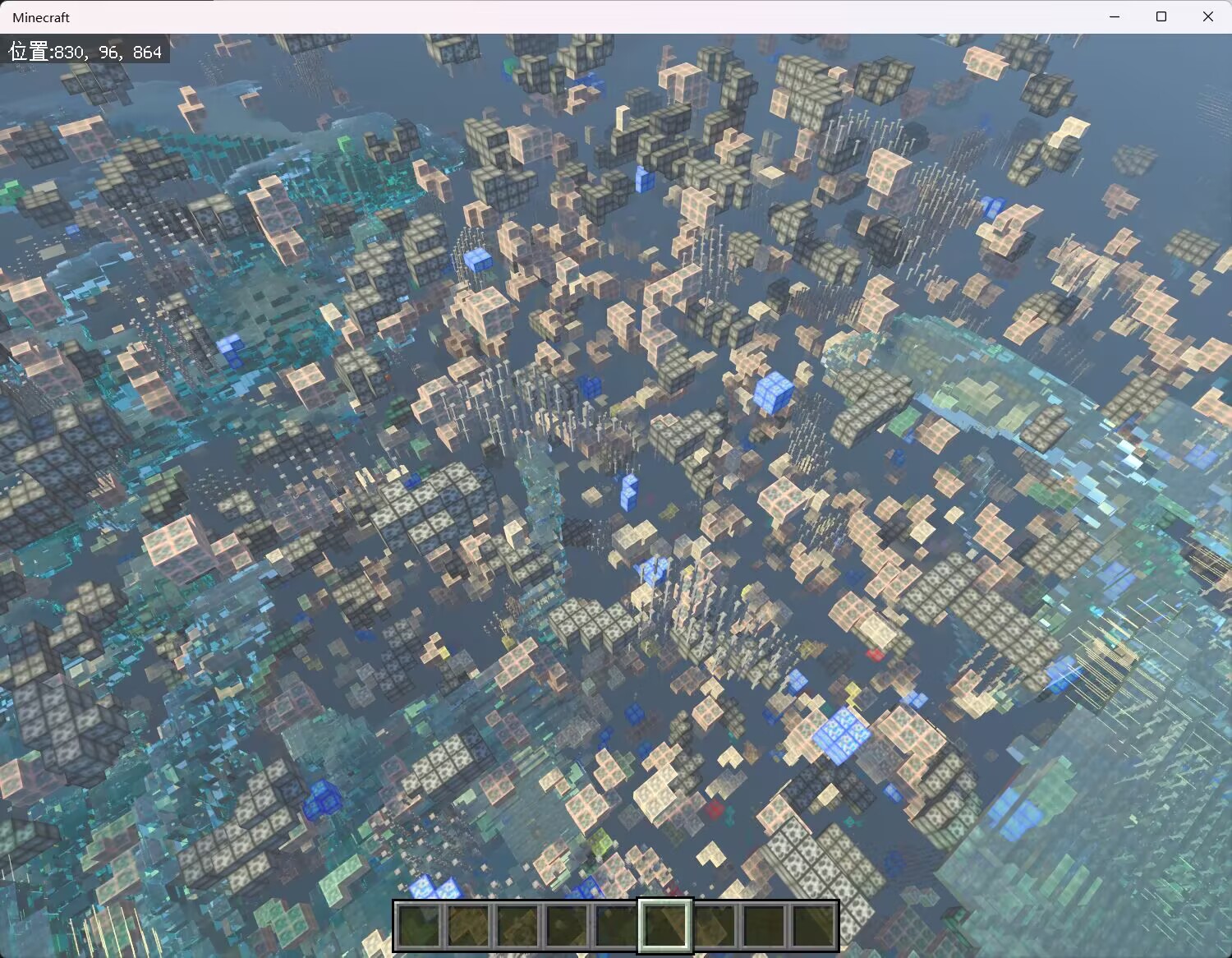
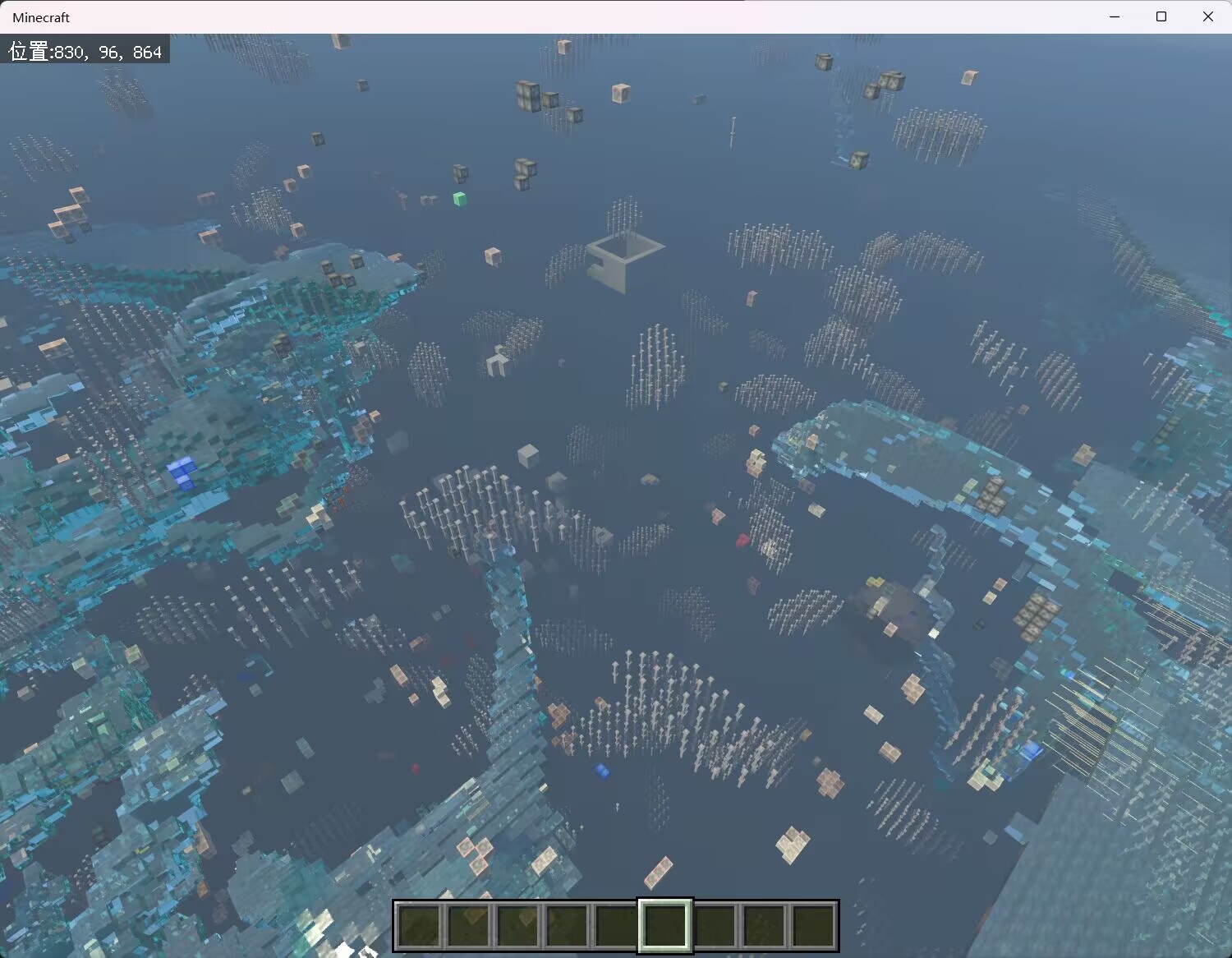
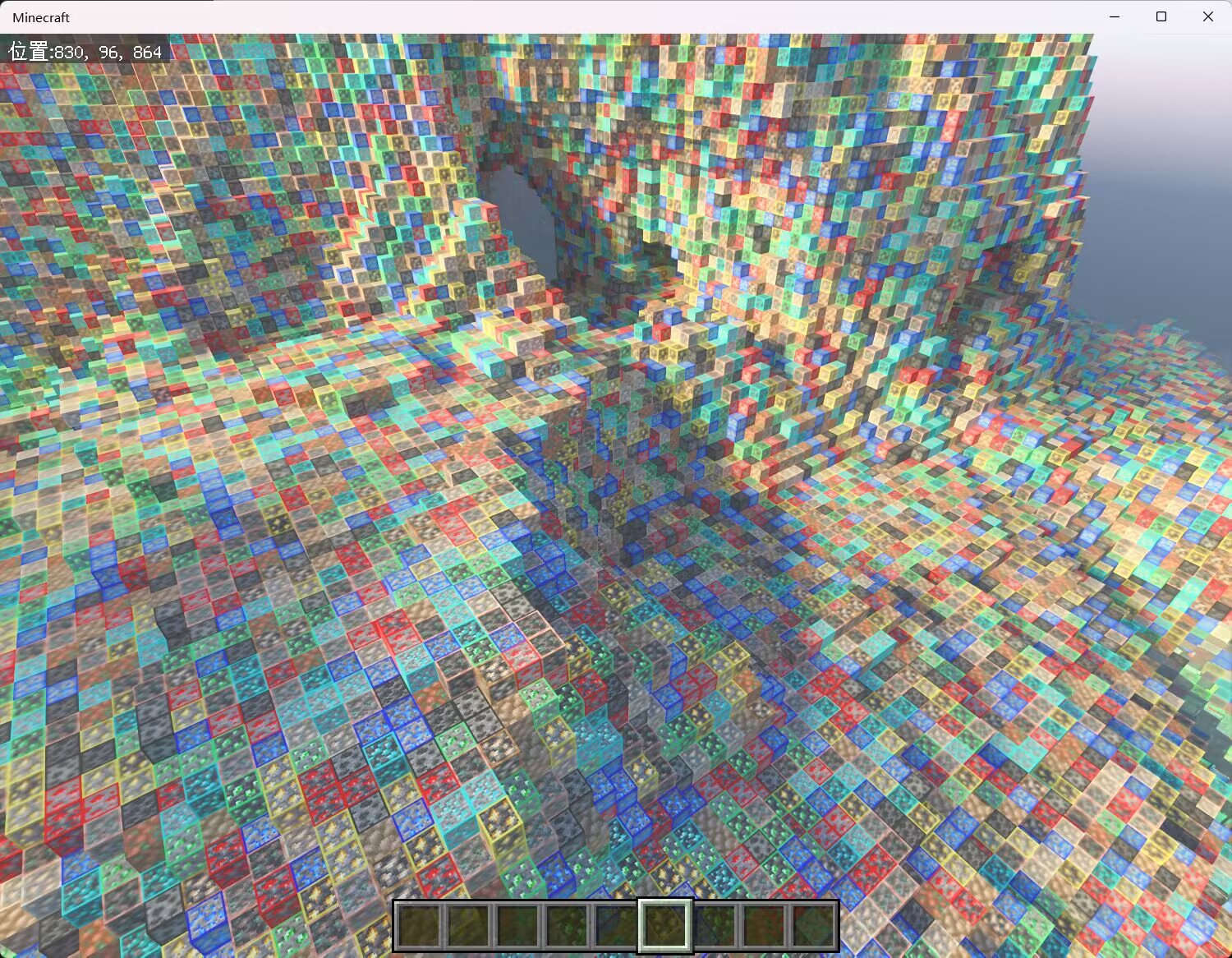
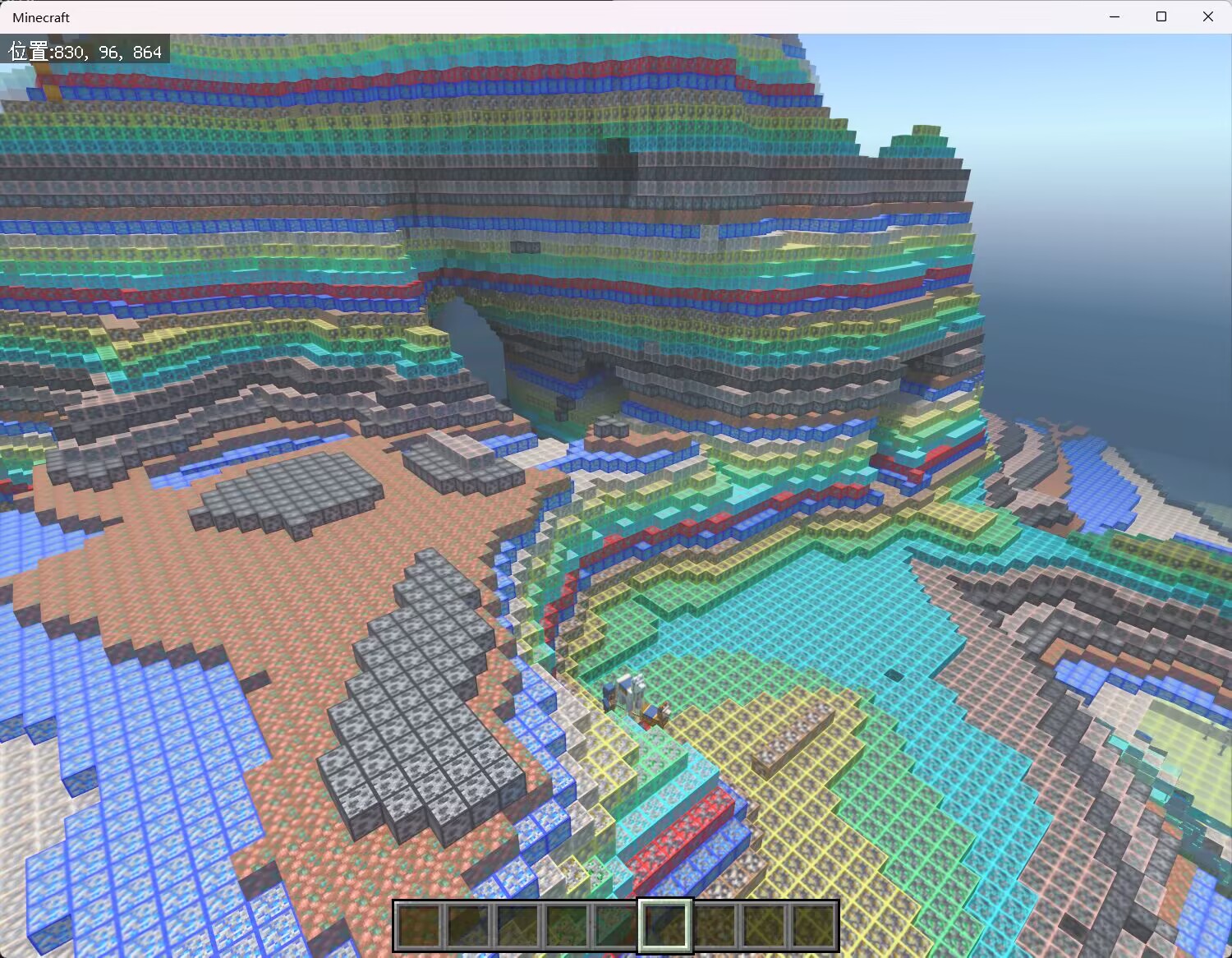
- engine-mode 0: when
"obfuscate_blocks"in config is covered by solid blocks on all six sides, it will be replaced with"main_block"or"main_block_minus"in config based on the dimension. - engine-mode 1: when a block is covered by solid blocks on all six sides, it will be randomly replaced by a block in
"obfuscate_blocks"in config based on the dimension. - engine-mode 2: works similarly to engine-mode 1, but instead of randomizing every block, it randomizes the block for each layer of a chunk.
You can intuitively compare the effects of different engine modes through the following images.
Engine Mode Showcase
No AntiXray
Engine Mode 0
Engine Mode 1
Engine Mode 2
Communication & FAQ
- Join our Discord community: https://discord.gg/7uJNS3tNa6
- Join our QQ Group: 642538983
Feedback
- Open an issue to report bugs.
License
- GitHub Release is the sole and exclusive official source for downloading. Any other source of download is unauthorized and constitutes illegal reproduction.
- Unauthorized reproduction, integration, or redistribution is strictly prohibited.